

 Amazon/Honey Jane Wyatt
We hope you love the products we recommend! All of them were independently selected by our editors. Just so you know, HuffPost UK may collect a share of sales or other compensation from the links on this page if you decide to shop from them. Oh, and FYI — prices are accurate and items in stock as of time of publication.
I hate cleaning. I know, that’s not revolutionary or new in any way. But if I’m being honest with myself, it’s simply not going to get done amidst the million other things I have going on at all times. I’m a busy gal!
Recently, I did something life-changing: I accepted that about myself, and got a robot vacuum.
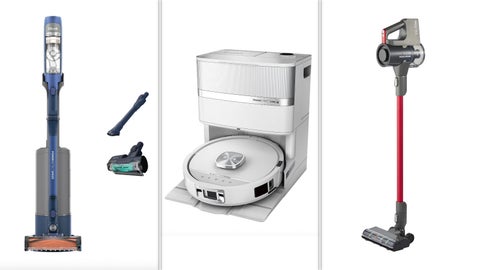
Specifically, the Shark PowerDetect UV Reveal, which hoovers and mops your entire house without you even having to think. I got it for full price but good news for you: you can get more than 50% off the original price of £1,099 on Amazon right now!
A robot vacuum is something I’ve been contemplating for a long time – I knew I wanted one that could do multiple things (I mean, preferably clean my shower and toilet, too) but I was yet to find the right one.
When Shark released its latest vacuum, I was convinced to finally make the jump.
Using UV detection, it’s able to find the most stubborn stains in your house that not even you can see. It also empties its own rubbish into its base, including dust and dirty mop water, so you don’t have to do anything – finally, exactly what I need.
An honest review of the SharkPowerDetect UV Reveal
First impressions
After managing to somehow lug the vacuum up my stairs by myself (that’s on going to the gym) it was time to face what I think is the worst part of getting any new product: the set up.
Luckily, assembling the parts was fairly easy – I filled the water tank with the included floor cleaner and plugged the base into a wall socket. Then came connecting the Shark Clean app to the vacuum, which was painless thanks to the inclusion of a QR code.
Somewhat surprisingly, the most difficult part was connecting the vacuum to WiFi. I’m Gen Z, so this shouldn’t happen, but it took me about three attempts to successfully make the robot stay connected.
Getting started
Once the robot was talking to me, I knew everything was working as it should. The app instructed me to get the robot to map my house, which it did quickly, marking out where there were chairs, tables, rugs, and sofas.
It also gave me the option to demarcate where each room starts and ends – great, as I have an open floor kitchen and living room – and section off ‘no-go’ zones the robot had missed on its initial scan.
Then came for the first clean. I asked it to vacuum just my living room, which it did with complete ease.
I hate to admit this, but I finally understood why some people get emotionally attached to their robot: watching it twirl around chair legs, figure out where my rugs start and end, and empty itself at its base was like watching a confused (but unusually elegant) dog sniff around my house.
My affection only grew when I realised, around 40 minutes later, that my house was completely spotless. Before investing in a robot vacuum, my biggest concern was whether it would be able to get deep into the corners of my room.
But thanks to the included side brushes, it managed to get into hard-to-reach spots, and spent more time around bases of chairs than I usually would when hoovering myself.
The mop function was also completely unobtrusive, as it dries after itself, so you never have to worry about slipping on its wet trail.
It also takes itself back to the base for an empty whenever its dust tank gets full, and (reassuringly) to clean its mop pad several times during the course of a full-room mop.
Added features
After using the vacuum for the first time, I used the Shark app to set a cleaning schedule.
What’s great is you can ask the robot to only vacuum or mop at a time – because who’s mopping every day unless you have a particularly dirty dog or mucky children – or to spot clean an area you’ve had an unfortunate spillage in.
You can even do this when you’re not home, so you know you’ll always come home to a clean house.
Much to my joy, that means I rarely ever have to think about cleaning, other than when I happen to be in my living room when it’s time for its clean, and every 60 days when you need to empty its base and refill its water.
Final verdict
Rating: 4.5/5
Pros:
It’s easy to use once you’ve set it upGets into the corners and around chairsDoesn’t leave a wet trail behind itCan detect where the carpet is and spot cleanEmpties its own dust and cleans its own water padCons:
A little noisyIt can’t clean your skirting or areas that are covered (duh)Connectivity to the app can be a little trickyOverall, I’ve been extremely happy with my new robot friend. Yes, I’ve developed an unhealthy dependence on it (don’t worry, I’m still cleaning the rest of my house) and find it way too charming.
Now, though, I no longer have to worry about doing basic but boring cleaning tasks. Naturally, its format means it doesn’t clean skirting boards or countertops, so Shark, please develop that next.
But it does a great job of checking off all-over vacuuming and mopping. The only drawback is that connectivity to the app can occasionally fall off.
I also think the Shark Clean app could use some work, it’s a pretty basic interface, which does get the job done, but in future I’d like to see more features.
For £489 on Amazon right now, though, I have no complaints. So run, don’t walk, because you only have 36 hours left to snatch up this, frankly, insane deal.
![[Catholic Caucus Devotional] My Catholic Life! Catholic Daily Reflections: The Quality of the Heart - Wednesday, August 19, 2026](https://home.snipesearch.co.uk/site/assets/img/broken.gif)




 Bengali (Bangladesh) ·
  English (United States) ·