

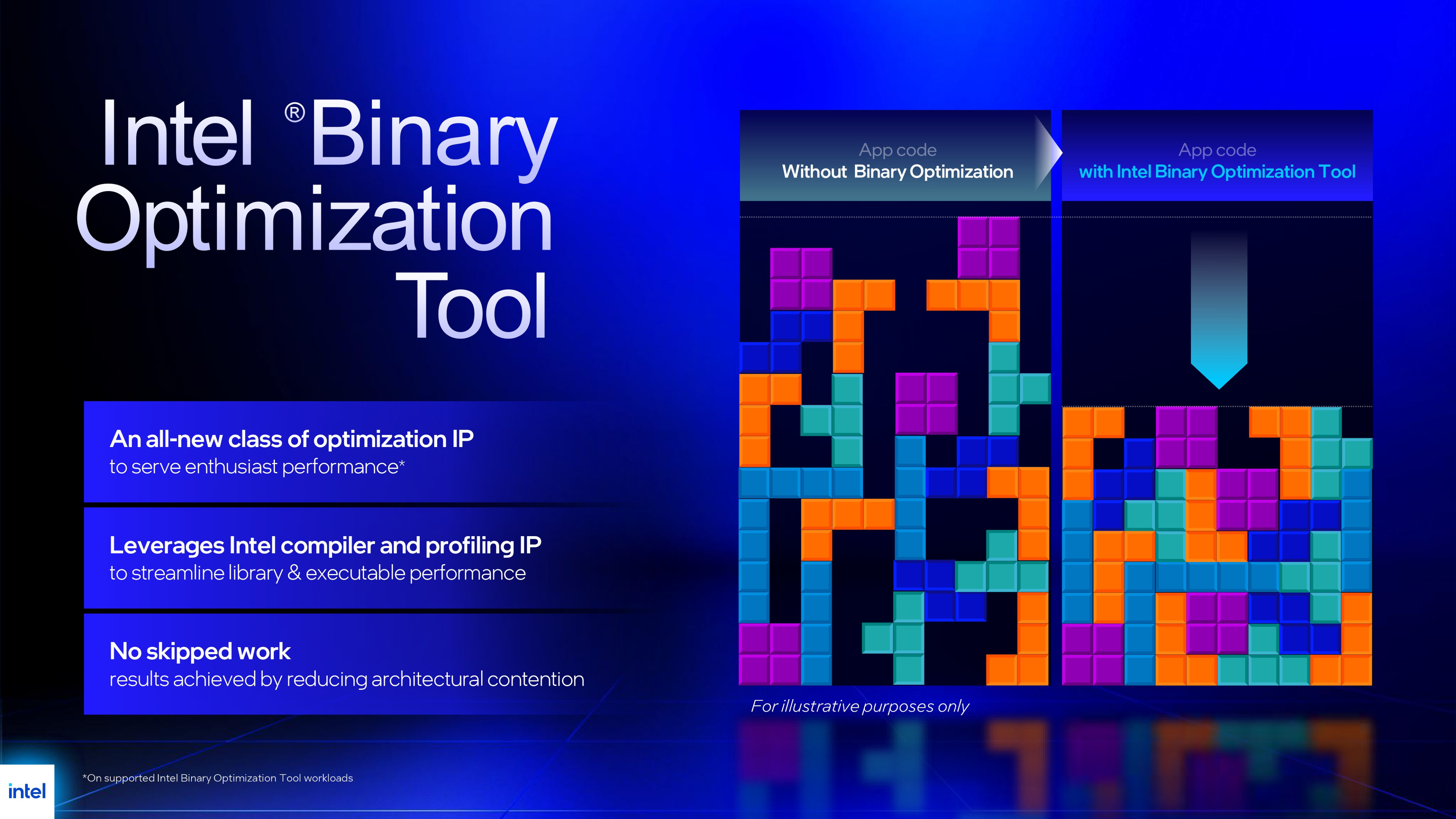
With the launch of its Arrow Lake refresh processors, Intel didn't just release some of the best CPUs it's made in years, it also introduced a new software package called Binary Optimization Tool, or BOT for short. Over the past week, I've been testing BOT to assess whether Intel's claims have merit and whether it will become increasingly important over time or fade into obscurity as a neat idea but not worth the time and effort.
But what exactly is BOT? The simple answer is that it's similar to how GPU vendors release drivers with fixes/support for specific games, where certain shaders are replaced by ones that ensure the game renders correctly on the graphics chip. What Intel is doing is rejigging certain thread instructions from a game, such that the CPU can process things more efficiently, making full use of cache, core execution units, and so on.
At the moment, BOT is only supported on desktop and mobile 200S Plus chips, such as the Core Ultra 5 250K Plus and Core Ultra 7 270K Plus, and Panther Lake laptop processors, and while there's a chance it could be brought to older processors, part of the changes in the Arrow Lake refresh were an increased number of hardware hooks in the compute tile.
These give Intel's engineers a better insight into what's going on deep inside the processor, and without those, it's possible that a BOT which supports earlier CPUs just won't be able to offer the same kind of uplift, if any at all.
However, it's also worth noting that Intel has only BOTified 12 games so far, and given that none of the testing, optimizing, and rewriting of instruction scheduling is a simple automated process, we're not going to see Intel churning out BOT updates on any kind of regular schedule.
(Image credit: Intel/Microsoft)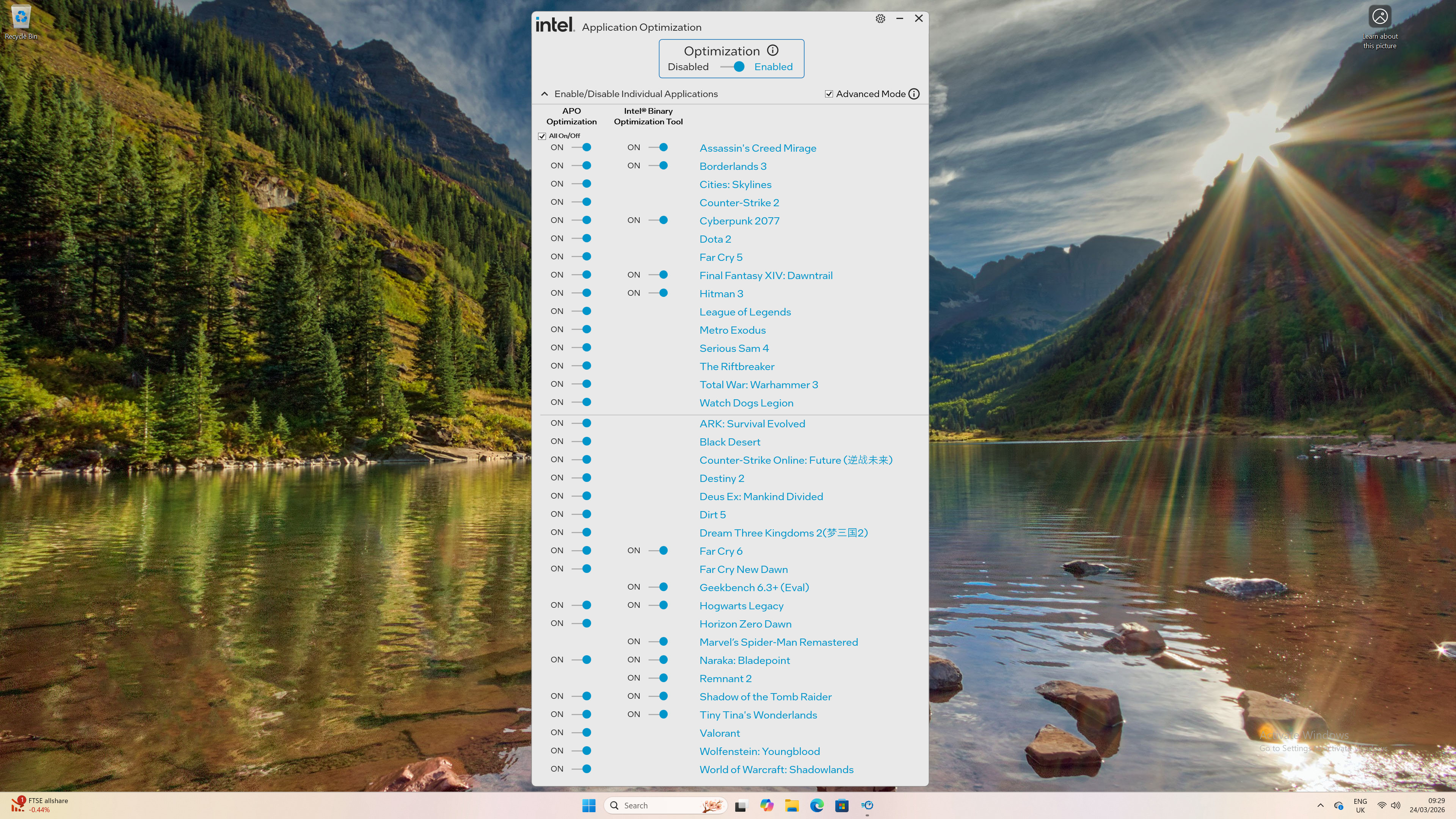
So if you were disappointed that the tool isn't being offered for your 14th Gen Core processor, for example, you're not missing out on anything if you don't play any of the currently-supported games.
Binary Optimization Tool has been integrated into the already-existing Intel Application Optimization Tool (APO), but as the two things are entirely separate, they can be independently enabled in games that support both options.
Enough jibber-jabber, let's get on with what's important here: how much more performance do you get from using BOT? Well, before we see any figures, let me emphasise something important here: Binary Optimization Tool is all about the CPU, so it won't result in games being rendered any faster, as such, because that's almost entirely down to the graphics card in your gaming PC.
But the CPU still needs to process graphics instructions for the GPU to crunch through, and if those threads aren't being handled quite right for Intel's Arrow Lake refresh architecture, then they might be causing a bit of a performance issue.
However, the rate at which a PC produces frames for display on a monitor is controlled by a number of factors, and the performance of the entire rendering pipeline is determined by the slowest stage in that chain. If that's not the CPU, then no amount of BOTification will improve the frame rate.
(Image credit: Intel)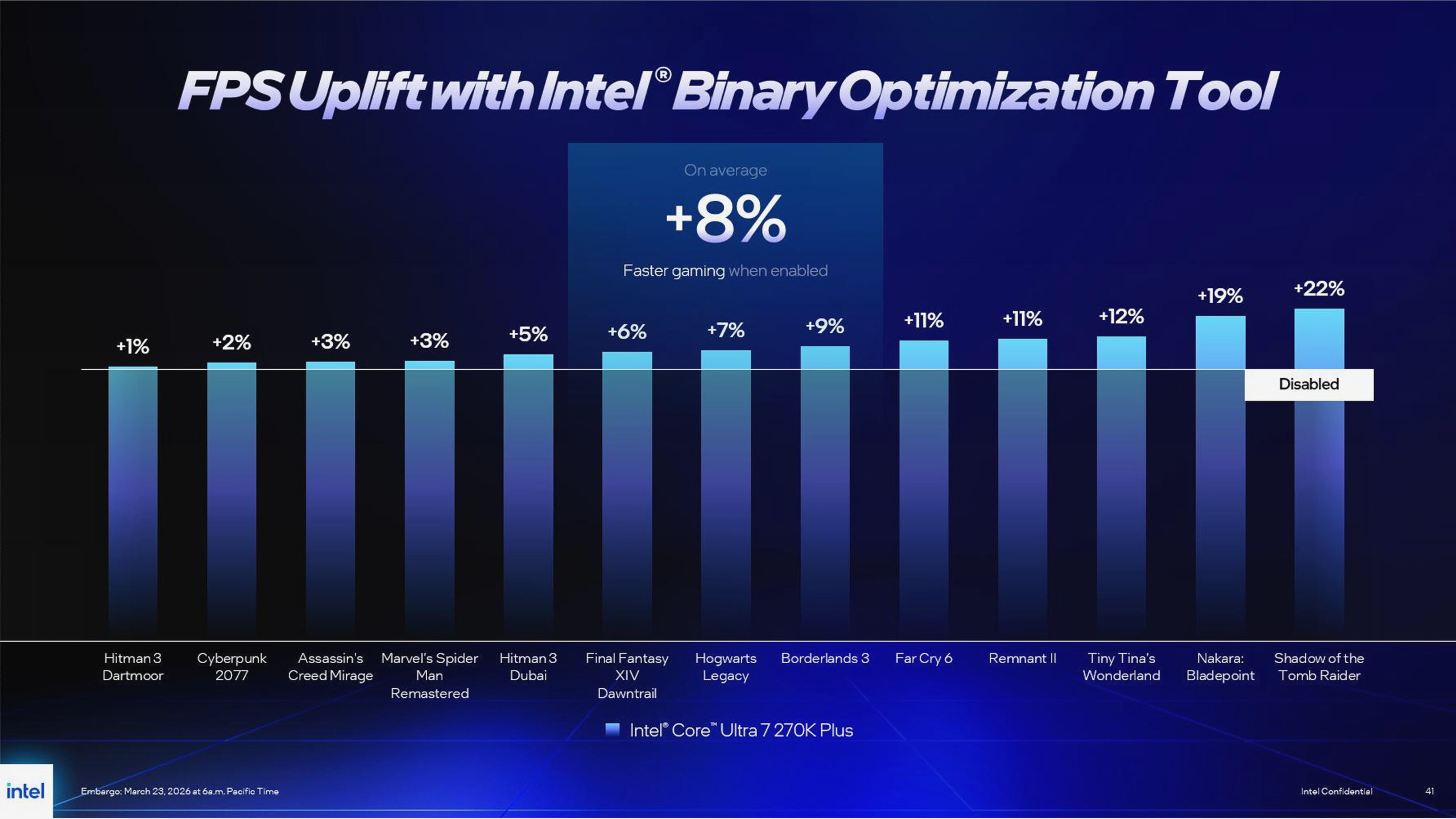
The first game I tested was Shadow of the Tomb Raider (SOTTR), as Intel claimed to achieve the biggest improvement in performance with the use of BOT here. The basic hardware setup for all my tests comprised a Core Ultra 7 270K Plus, 32 GB of Corsair Vengeance DDR5-6000 CL30, and a Zotac GeForce RTX 4070. Most tests of this ilk are done with an RTX 5090, but using a mainstream GPU gives you a more real-world view of what BOT can achieve.
SOTTR has a really good built-in benchmark tool that separately tracks the speed at which the CPU processes the game's main engine, as well as rendering instructions, and how fast the GPU churns out frames.
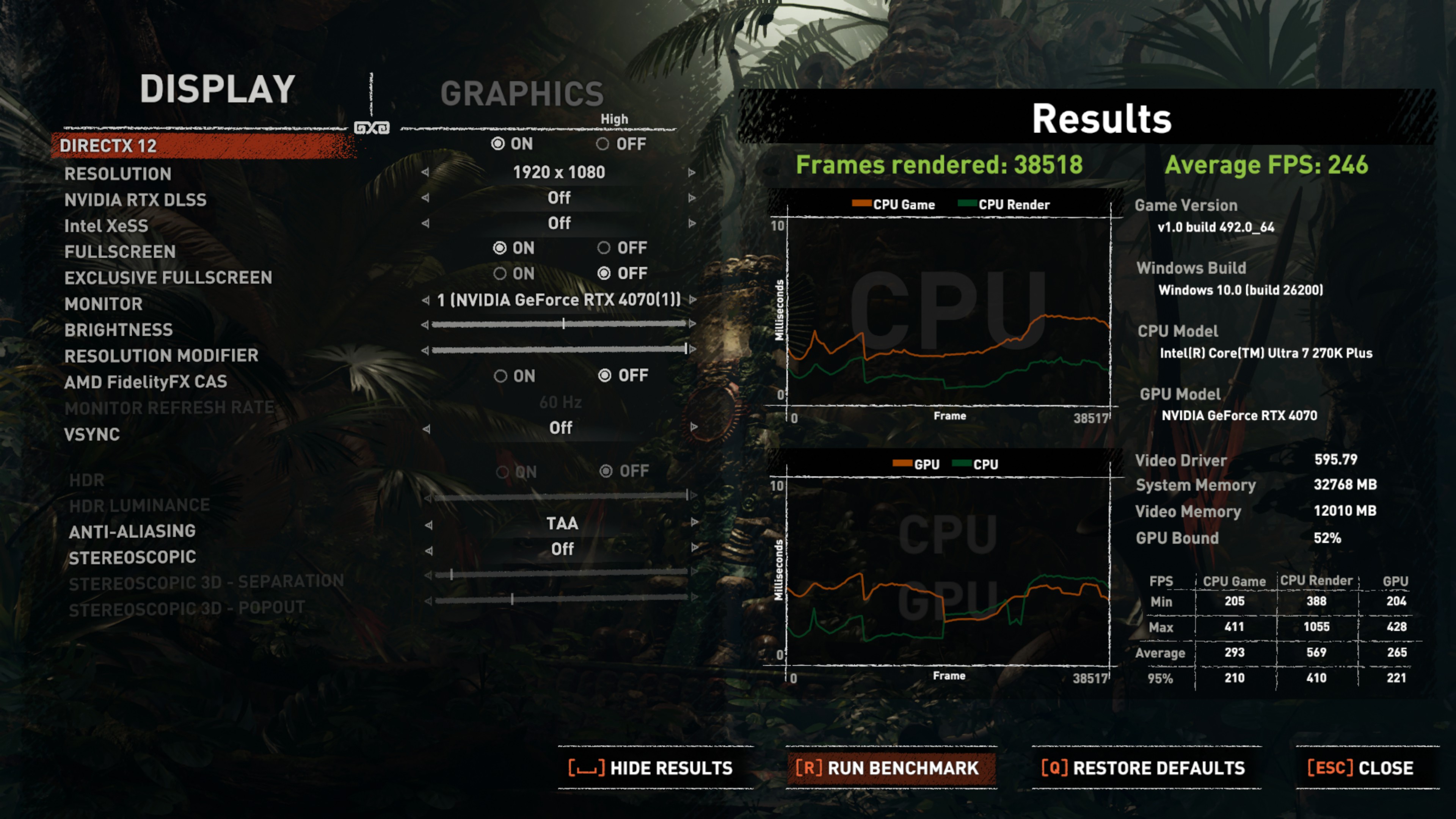
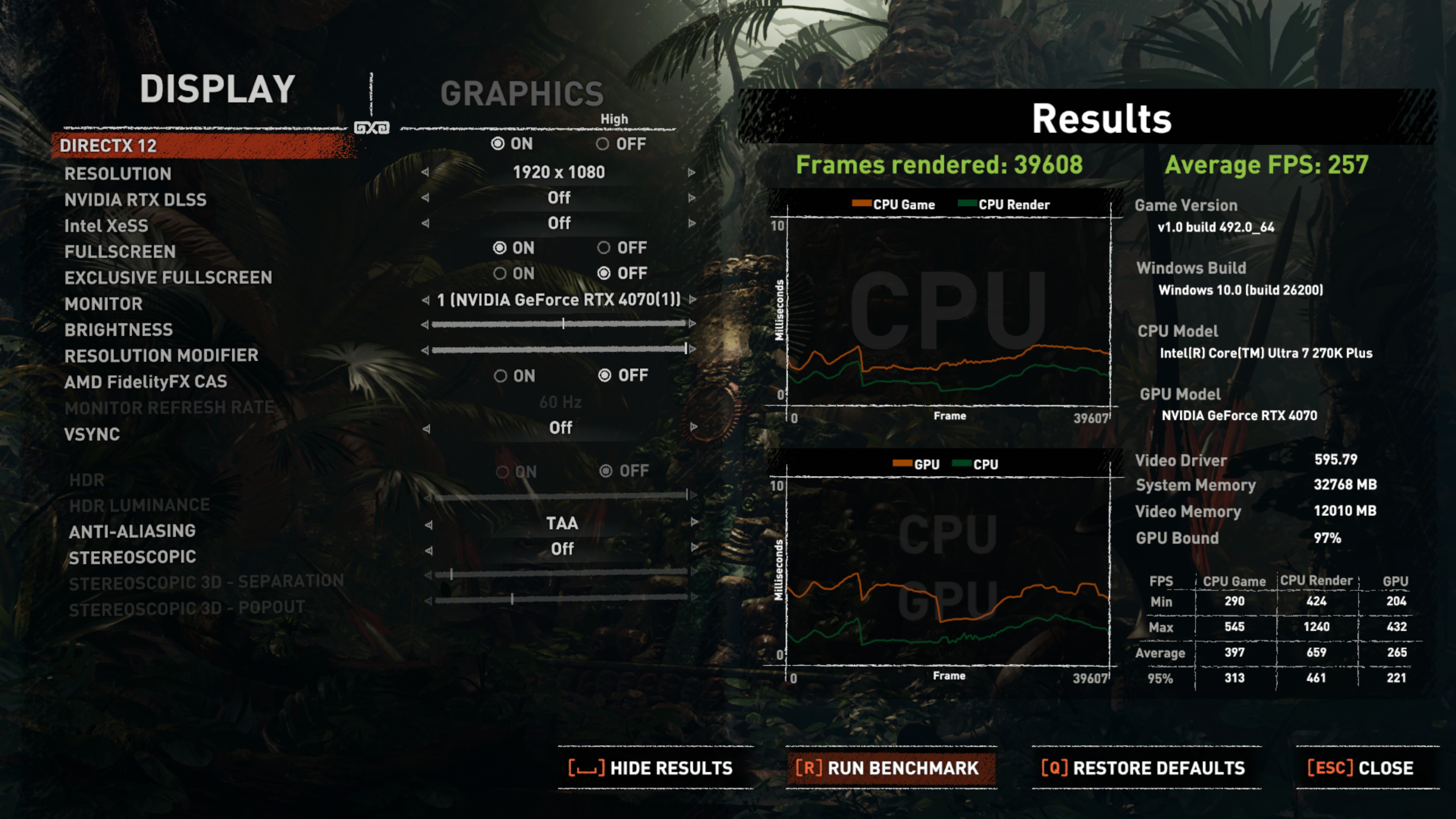
For the sake of simplicity, I've enabled APO and BOT together (the former doesn't make a huge difference with Arrow Lake, as the E-cores are really very good), and the effect is quite dramatic. Together, the optimizations lift the 'CPU game' performance by 35% on average, with the 1% low figure increasing by 41%.
 Intel APO + BOT disabledSquare Enix
 Intel APO + BOT enabledSquare Enix
I've done multiple test runs for each game, and in some instances, the SOTTR 'CPU game' improved by as much as 58%, which is quite incredible to see. However, the overall benchmark never gains anything more than 4 or 5% to the average frame rate, and that's because at 1080p High, SOTTR is relatively GPU-bound on an RTX 4070.
But look closely at the above images, specifically the frame times for the GPU and CPU (green line in the bottom graph, lower is faster). Notice how much APO+BOT speeds up the rate at which the CPU crunches through everything in the second half of the benchmark. It transforms the test from being 52% GPU-bound, on average, to 97% GPU-bound; that's exactly what you want from a game.
However, that's just a fancy benchmark, right? It's not the game itself. To that end, I tested Marvel's Spider-Man Remastered, which is a game that Intel only offers BOT for, and it has no built-in benchmark, so the results are 'pure' gameplay.
Over the course of five minutes of swinging around the city, I recorded an 8% higher average frame rate and 7% better 1% lows with BOT enabled, at 1080p High. Those figures would be lower at a higher resolution, of course, but they would also be better with a more powerful graphics card than an RTX 4070.
Alas, these were the highlights of my testing. Cyberpunk 2077 at 1080p High only improved by 2% on average, as did Borderlands 3 (also 1080p High), though the latter's 1% lows actually decreased by 4% (but that game's been twitchy from the get-go). And in Assassin's Creed Mirage and Hitman 3, I experienced almost no improvements with APO and BOT enabled.
In the case of the Mirage, the issue there was certainly the RTX 4070, despite running the game at 1080p High. Dropping the graphics preset to Low and enabling DLSS Ultra Performance saw the combination of APO and BOT improve the average and 1% low frame rates by 3% apiece.
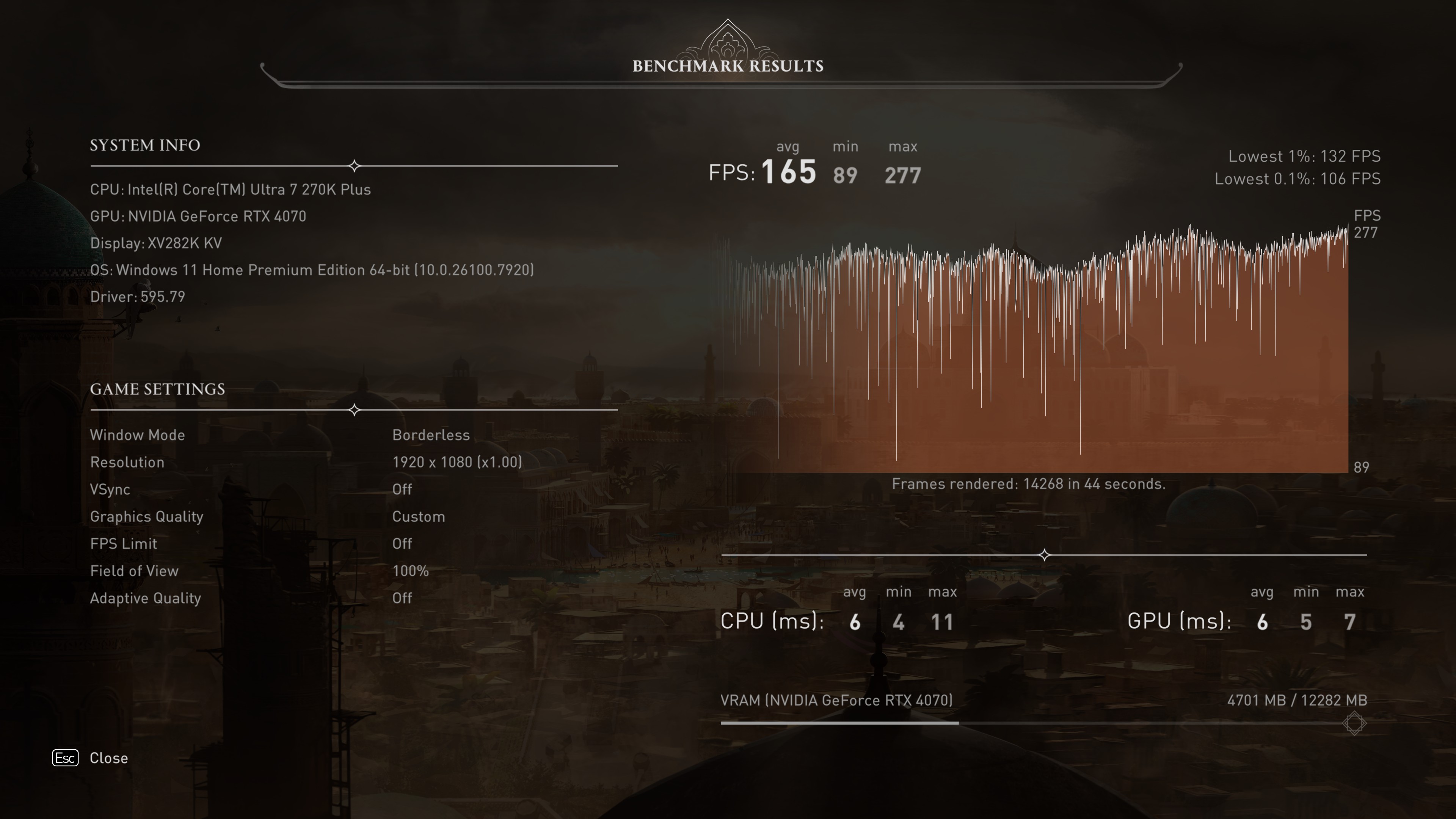 Intel APO + BOT disabled - 1080p HighUbisoft
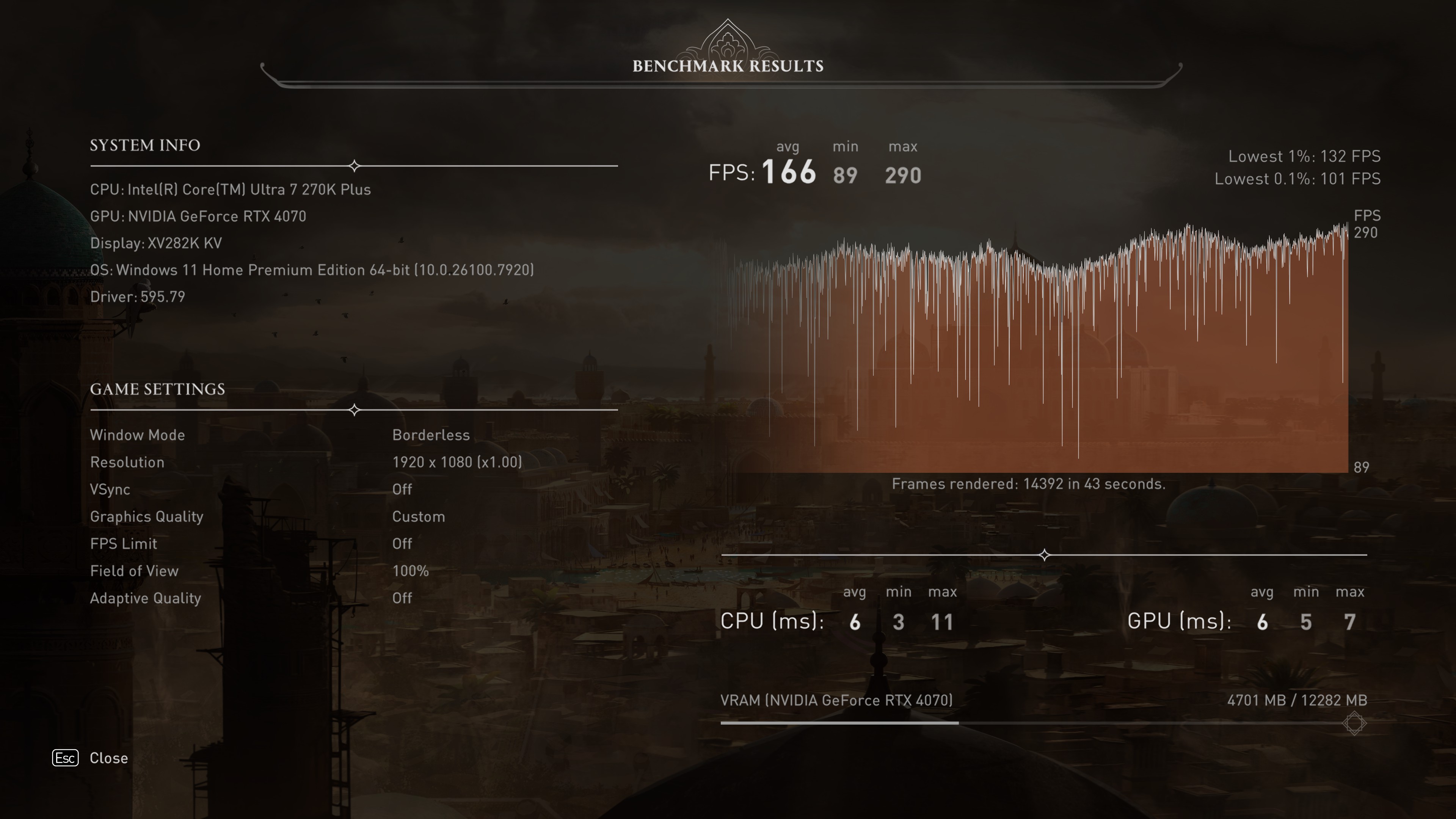 Intel APO + BOT enabled - 1080p HighUbisoft
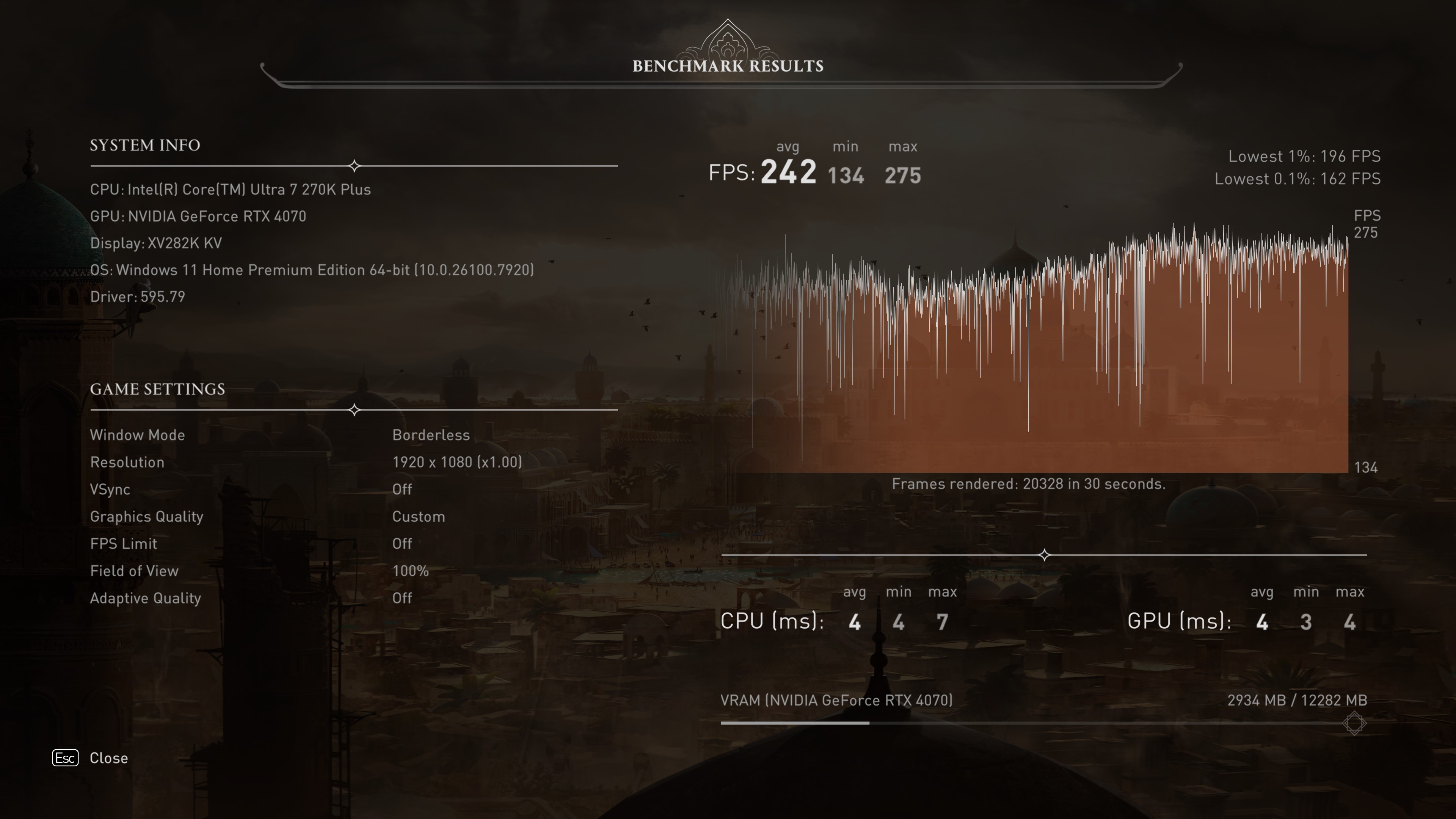 Intel APO + BOT disabled - 1080p Low, DLSS Ultra PerformanceUbisoft
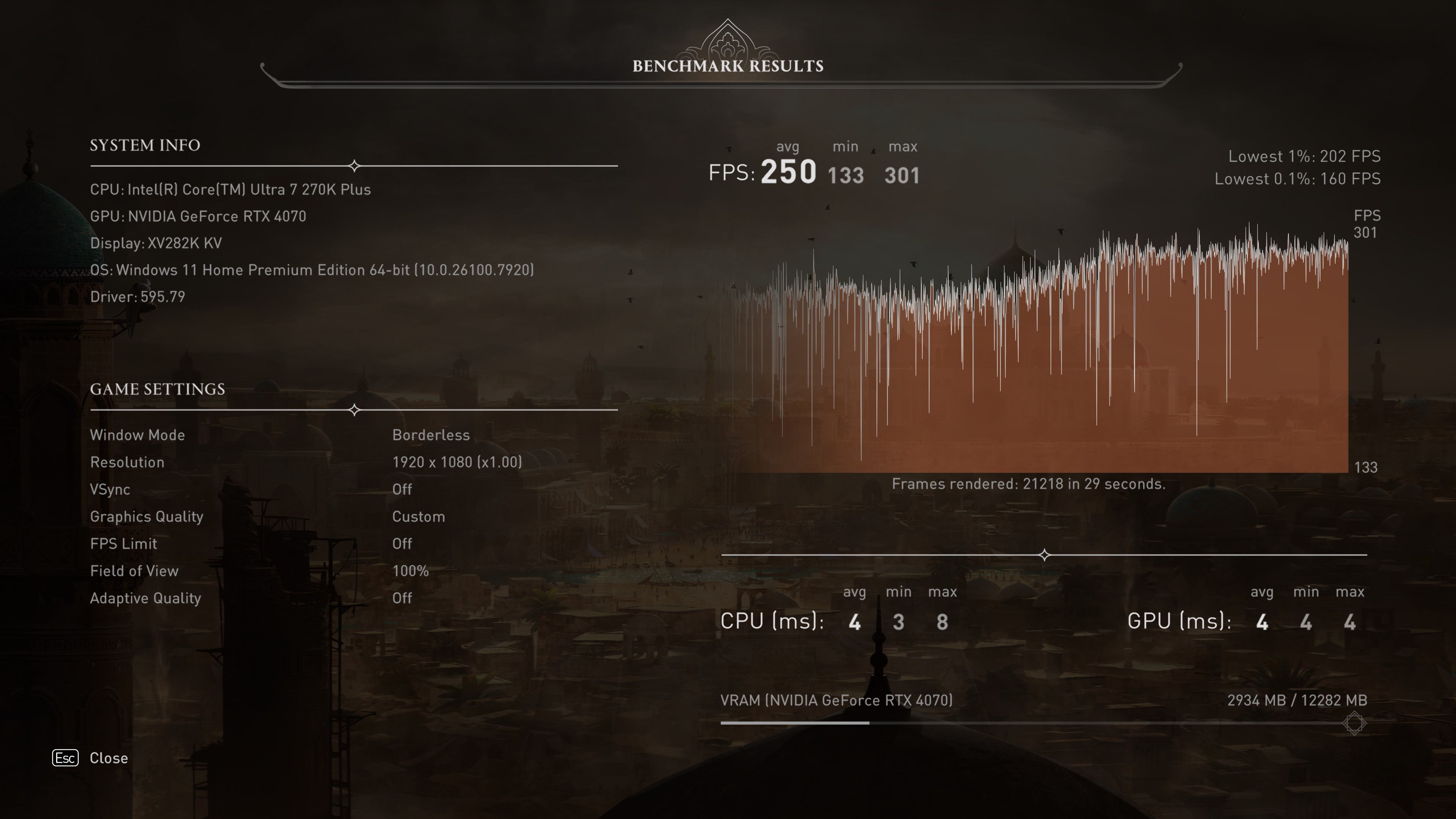 Intel APO + BOT enabled - 1080p Low, DLSS Ultra PerformanceUbisoft
So, what to make of all of this? To start with, Intel's Binary Optimization Tool clearly works as claimed for the most part, and for games that have CPU instructions written in such a way that the Arrow Lake refresh chips aren't handling them as well as they could, BOT is literally a game-changer, as it pushes the performance limitation to where it should be, i.e. on the GPU.
Having your graphics card be entirely responsible for the end frame rate means you can fully control the performance you want by changing graphics settings, using upscaling and frame generation, and so on. However, if a game is already GPU-bound on your gaming PC, then no amount of BOTtastic tweaks will make a difference.
Benchmark | Settings | Intel APO + BOT disabled (Avg. FPS / 1% low FPS or min FPS) | Intel APO + BOT enabled (Avg. FPS / 1% low FPS or min FPS) | Performance difference |
Shadow of the Tomb Raider - 'CPU game' test | 1080p, High | 293, 205 | 392, 290 | +35%, +41% |
Marvel's Spider-Man Remastered | 1080p, High | 201, 116 | 218, 214 | +8%, +7% |
Cyberpunk 2077 | 1080p, High | 146, 118 | 149, 119 | +2%, +1% |
Hitman 3 Dubai | 1080p, Medium | 144, 129 | 144, 131 | 0%, +2% |
Borderlands 3 | 1080p, High | 206, 132 | 211, 127 | +2%, -4% |
Assassin's Creed Mirage | 1080p, High | 165, 132 | 166, 132 | 1%, 0% |
Assassin's Creed Mirage | 1080p, Low + DLSS Ultra Performance | 242, 196 | 250, 202 | +3%, +3% |
This is most evident in Cyberpunk 2077, Hitman 3, Borderlands 3, and Assassin's Creed Mirage, with an RTX 4070, whereas Spider-Man Remastered picks up a decent enough performance increase with BOT. While 8% isn't overwhelming, the fact that you're getting this from a mere software override is quite impressive.
There is a category of games, though, that would really benefit from Intel's BOT: esports, especially competitive shooters. Pro gamers typically use a combination of the lowest graphics settings and 1080p resolution to get the maximum possible frame rate, and this typically results in the game being almost entirely CPU-bound.
Unfortunately, you're not likely to see Counter-Strike 2, Valorant, or Overwatch getting BOT support anytime soon. That's because Intel's system has to inject itself into the game's code to override instructions, and any software that does that in a competitive game will generally result in the player getting a very swift ban.
Intel says it's working with studios and developers to find a way of implementing BOT that won't cause issues like this, but I suspect that some companies are wary that cheaters will find a way to use BOT to implement a hack and cheat away to their heart's content.
Having spent a long time developing Binary Optimization Tool, Intel certainly isn't going to drop it if esports publishers ultimately say no to BOT, and I reckon that the feature will become even more prevalent when Nova Lake finally makes an appearance (currently on track for later this year, but who knows for sure?).
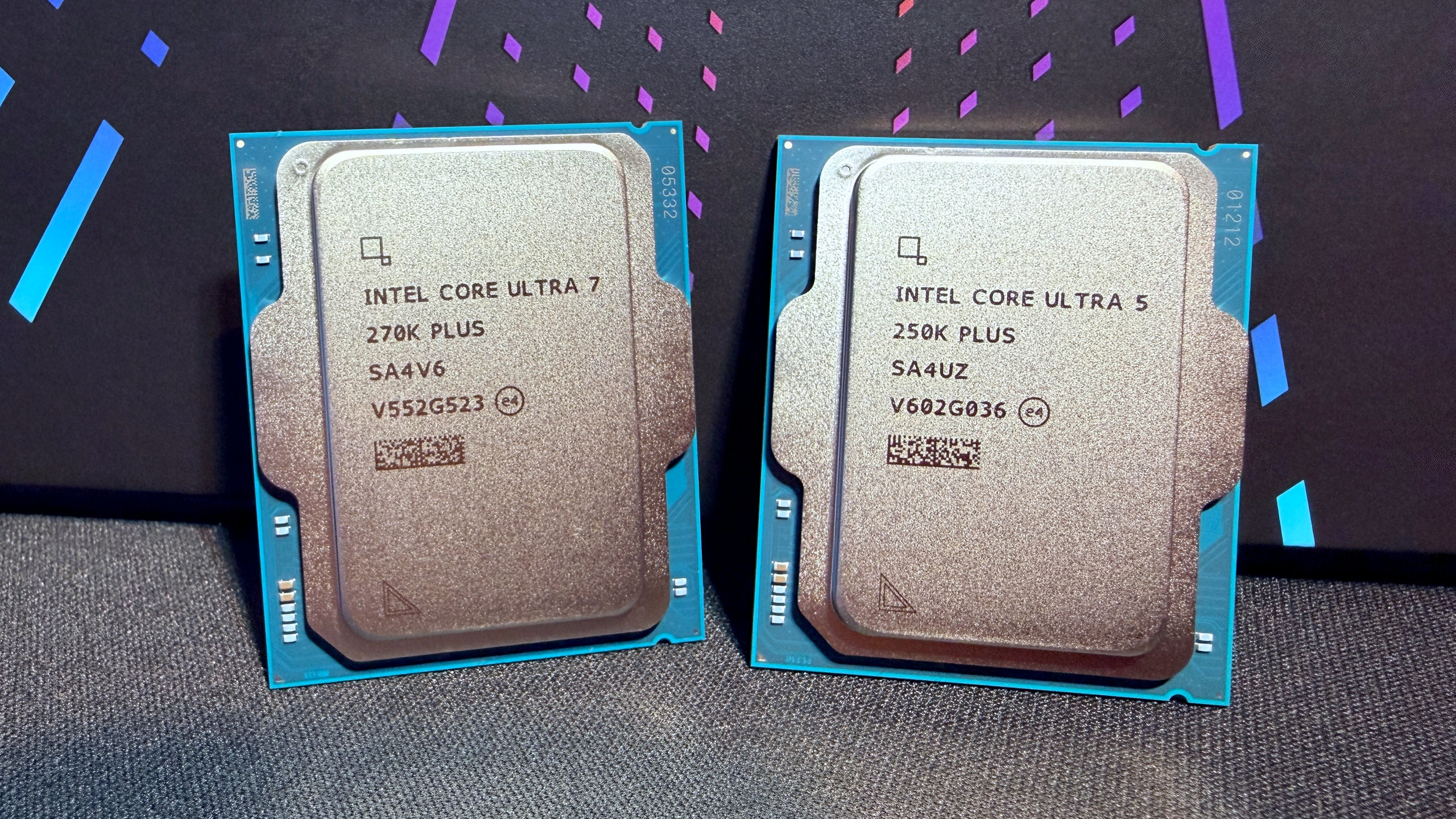
Right now, though, you can only take advantage of it if you have a Core Ultra 200S Plus chip, and while they're really very good processors, that's going to be a very small pool of PC enthusiasts who will get to see it in action. Current Arrow Lake owners might not be tempted to splash out $200 or $300 on a new CPU, just to use BOT, but you will see some pre-built PCs sporting a 250K Plus or 270K Plus chip over the coming months.
But even so, that's still not going to result in many gamers testing out BOT and giving feedback to Intel about its usefulness. Which is a shame, because the benefits are definitely there.
If you do happen to buy a new Arrow Lake refresh chip, then simply download the very latest Intel Platform Performance Package (IPPP), install that, and you should be able to dive into BOTifying the small number of games currently supported.
A word of caution, though: When I first tested BOT, on a PC with a fresh Windows installation and the motherboard handling the automatic installation of drivers, I found that BOT actually made things a lot worse (up to 25% lower frame rates).
After discussing these issues with Intel, I tried a new installation of Windows, disabled the motherboard's auto-driver feature, and just installed IPPP and the GPU drivers. That resulted in a perfectly working BOT, so if you do have an Arrow Lake PC at the moment and you slap a 200S Plus into it, you might find that the only way to get BOT working properly is by doing the same 'fresh Windows + IPPP-only' installation that I did.
Intel's had a couple of rough years of late, and while it's not totally out of the woods just yet, the likes of Binary Optimization Tool and the Core Ultra 200S Plus processors show that all the internal changes it's made (new staff, restructured divisions, 'listening to the customer') are starting to bear fruit. Let's hope that this new Intel carries on this way for good.





 Bengali (Bangladesh) ·
  English (United States) ·