
 16 hours ago
1
16 hours ago
1 
AI is powerful enough to analyze your finances in seconds and find things you’d probably miss
It can also end up with enough information to know every aspect of your financial life.
So, how do you get the benefits without giving away more than you’re comfortable with?
The best way to use AI with your money when you’re concerned about privacy is to not use AI with your money. (there are a lot of great tools available)
Here’s the second best way, or at least how I do it.
Please tell me if you see any holes or mistakes!
This is a work in progress, I’m learning as I go with this too, thank you!
What Are We Afraid Of?
Let’s say I stick all my statements into ChatGPT, what am I afraid will happen?
They would store my information somewhere forever and I won’t be able to remove it. They will use it to train a model It might get leaked in a breach later onAll legitimate concerns and, let’s be honest, we can never be sure but here’s what we can do to protect ourselves.
How To Limit Data Being Saved
Build a Local LLM
This is the ultimate privacy protection because a local LLM operates on your hardware and your data never leaves. This is, however, also out of my area of expertise. I’ve read about it and even had ChatGPT educate me on it but it requires hardware capability that I don’t have or wish to buy.
But if you did have the hardware and the inclination, you can build one and ChatGPT can teach you.
Use Temporary Chats
Temporary chats are like incognito mode for your browser, nothing gets saved to your history. In the case of ChatGPT, it won’t remember them and it won’t be used to train models. They will get saved for up to 30 days for “safety and abuse monitoring.”
🚨 For a period of time in 2025, Open AI kept deleted and temporary chats from mid-May to September due to a court order because of a NYT copyright lawsuit. They’ve since been deleted and temporary chats follow their published policy but know that a court order can force preservation.
Other models follow roughly the same rules for their version of incognito chats.
If you don’t use temporary chats, your documents may not include your personal information but ChatGPT will associate them with you. Unless you turn off memory, it’ll know your spending and likely reference it later since it adds to context. I’m not sure if this bothers me yet.
NOTE: If you use temporary chat and want to make it permanent, there’s no mechanism for doing that. You have to copy and paste the whole chat into a regular one.
Be Careful With Questions
Depending on how private you wish to be, be careful with the questions you ask.
If you ask “Should I pay off my debt on my Chase Sapphire Reserve card?” then you’ve just told the model that you have a Chase Sapphire Reserve card. You may not care about this level of privacy but it’s something worth noting.
It’s easy to reveal your salary, employer, home value, kids ages and names, and other information through your questions. Just be careful to share only what you want the model to know.
Turn Off Training
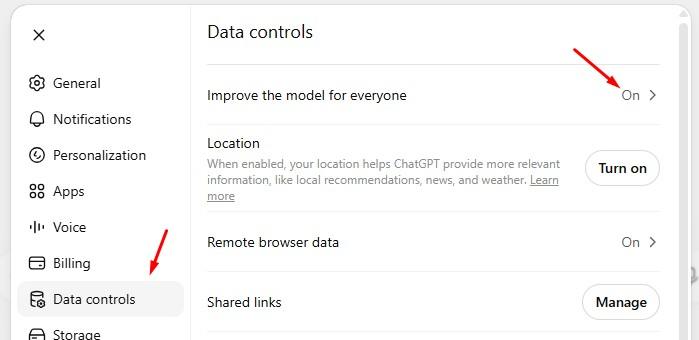
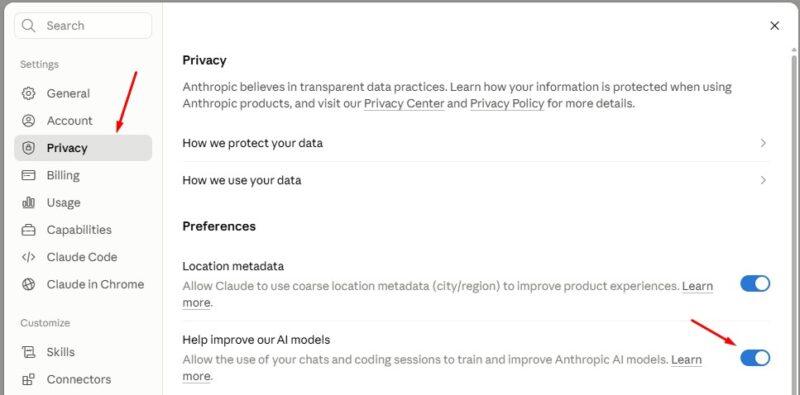
You can turn off training so your data isn’t used to improve any models.
In ChatGPT, it’s under Settings -> Data controls -> Improve the model for everyone:
In Claude, it’s under Settings -> Privacy ->Help improve our AI models:
How to Sanitize Your Statements & Data
Download Transactions Only (Credit Cards, Bank)
For credit cards and bank accounts, where your transactions tell the story, you can often just download a list of transactions. Often without any of your personal information.
For example, with a Chase credit card, simply navigate to your card’s list of transactions and you can download them:

You can download practically any time period you can imagine, including All transactions:
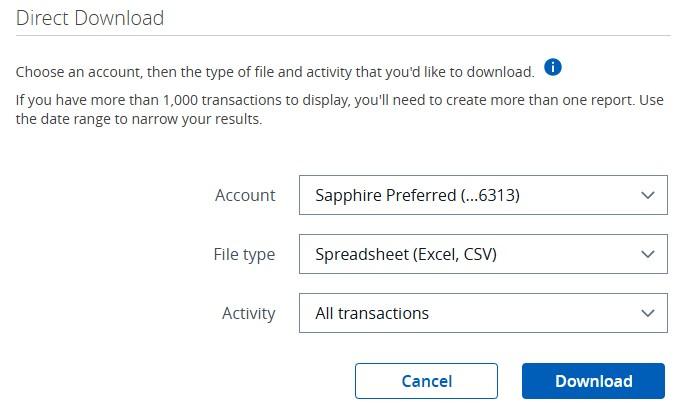
Then you get an Excel spreadsheet with no personally identifying information. It is your information but lacks personal information inside the document.
Do not blindly upload this to ChatGPT! Double check there is no personal information.
When I downloaded the transactions for my Citi Costco Card, it did contain a column with our names. This was probably because we had two cardmembers but that’s easy to delete before you upload.
If it is possible to build your portfolio through a download of transactions at your broker, wonderful. Do that too. Some brokers don’t offer a clean easy way to download your balances without including your information.
Download Quicken File (Brokers)
There are some accounts, like your brokerage, where downloading transactions doesn’t help unless you can download all transactions ever to an account.
In these cases, you could try downloading a file that would normally be imported into Quicken. Many brokers (and banks and credit cards) offer this because of how popular Quicken was. In many cases, it does not include your name or address but it will include account numbers.
When I downloaded my transaction history, two pieces of identifying information were included:
my account username next to an <INTU.USERID> field, and my account numbers were listed next to a <ACCTID> field.And there is a third field, <SESSCOOKIE> that is usually used by Quicken when it communicates directly with the server. It’s used to record session data and while it’s unlikely sharing it with an LLM is going to be a security risk, delete it before you upload.
Once you delete or replace all three values (or more, depending on the # of accounts you have), it’ll be scrubbed and your favorite LLM can analyze it. (for account numbers, I’d replace them with a unique number so it can separate account information)
Manually Scrub Personal Information
If your brokerage doesn’t offer any other way to get out your information, you’ll have to scrub it yourself.
Personally, getting a statement and blacking out certain parts is cumbersome. And if you go to edit a PDF and put a black box over it, in some cases you actually still reveal that data because the editor is just visually putting a black box over it… AI models may still be able to read what’s underneath.
Also, some documents have metadata like your name, company, or the document’s creator. Make sure you remove those as well.
Instead, just take carefully cropped screen captures. Load up your accounts, take screen captures of your balance and holdings, and upload those instead. Crop it in a way that does not reveal any account numbers and you’re good to go. Any LLM will be able to read the information from the images.
Don’t Upload These
Just as a precaution, don’t ever upload these:
Driver’s license Passport Social Security card Tax returns with SSNs Password exports Seed phrases or private crypto keys Authentication backup codesIs It Worth The Hassle?
The fun part about playing with LLMs is that you can ask it plain English questions.
I uploaded all of our scrubbed credit card transactions (all 2025, and year-to-date on 2026) and asked it to break down our spending, compare spending trends, and give us any advice on places we could save.
Remember that models can hallucinate. They can be wrong. They can be trained on the wrong information. They can find patterns but don’t just blindly trust whatever advice they give you. Assume it can be wrong and get confirmation separately.
This insight was useful: “Your spending isn’t characterized by lots of small leaks—it’s driven by a handful of intentional, high-cost priorities: family, travel, childcare, and experiences. That means meaningful savings are most likely to come from planning and capping those big categories rather than obsessing over small daily purchases.”
In other words, don’t sweat the small stuff and buy that morning latte (which I don’t because I work from home!). Plus we have a nice coffeemaker because I believe in Upgrade and Save Strategy.
It also surfaced that we spend a lot on travel. You can ask it to try to guess your trips… and it’ll do a pretty good job. It was able to identify all the trips we made and tell us how much each cost. There are hiccups, like anything prepaid was separated out as its own trip (like flights), but that’s because I didn’t have any history. The more you talk, the more it’ll remember and I can tell it that the flight I purchased in February was actually for my trip in June.
Finally, I sent it my investment portfolio and asked it to analyze it given I was married, mid-40s, four kids, and what it thought. I recognize I gave it very little, an incomplete picture of my finances, but I wanted to see what ChatGPT would say.
And it gave me a good picture of my investments (and my thoughts):
You own excellent businesses. The Ally portfolio is full of companies I’d describe as high-quality, durable businesses: After I sold my first blog, I bought a lot of dividend paying companies to replicate a paycheck since I was no longer bringing in cash. I was building an annuity but with dividend stocks that would likely grow. Your costs are extremely low: Since most of my investments are in Vanguard funds, this tracks. You’re not chasing trends: It’s just boring dividend stocks and Vanguard funds. You own a lot of the same thing: This is true too. I do own VOO, VFIAX, and VTI which overlap a ton. That’s because they were acquired at slightly different times but they all serve the same purpose. U.S. equity is doing almost all the work: My asset allocation is 80% U.S. stocks, 10% international, 2-4% bonds – this is by design. If you take the 120 – age rule, perhaps I’m a few percentage points high on US stocks but nothing egregious.Here is something that it did surface:
LUV is one holding I’d question.
At nearly $119k, it isn’t huge relative to your total portfolio, but it’s also not a company I’d consider to have the same competitive advantages as Berkshire or Costco. If you wouldn’t buy it today at its current weight, it’s worth asking why you still own it.
I acquired those shares in 2009 and 2010 and am sitting on nearly $100,000 in long term capital gains. That’s quite a bit in a single company, especially in such a volatile industry as airlines.
But before you get too excited… it’s works out to be an annual rate of return of 12%, which lags the S&P 500 which returned 14.4-14.9% over that same period (VFAIX, dividends reinvested). By owning LUV, I lost $31,000-$38,000. Ouch.
Is This Better Than Apps?
The natural comparison is: Are you better off using an LLM yourself or just paying for an app that uses AI to help you save money and invest better?
By doing it yourself, you have better control over your data. Many apps will use Plaid to connect to your accounts, which is a read only connection but introduces more parties to your data. You are limited only by your imagination and how thorough you are in your thinking.
OpenAI recently released ChatGPT Finance. This mimics a lot of what apps offer and connects using Plaid, the same technology that many apps use. I have not yet tried it but it’s included with ChatGPT Plus ($20/month). If you’re paying for ChatGPT Plus and are comfortable with Plaid, I’d try this before paying an app separately to see what it offers.
By using an app, you get immediate insight based on the app’s specialty. If it’s budgeting, they will have nice charts and good insights to pass along. If you use a tool that lets you ask questions, say a Boldin’s assistant planner, you can start with a good base and still have the casual conversations.
I would start with an LLM first unless you have a specific issue you know an app will address. If you know you need help with budgeting and spending, I’d try Monarch Money because the spending categorization of LLMs right out of the box will not be as accurate.
Alternatively, I don’t think you need an app to help with simpler tasks like identifying and cancelling services. LLMs can discover those for you easily and you can cancel them or renegotiate them yourself. I bet ChatGPT Finance is even stronger on this because they tout this as a feature.
AI doesn’t need to know who you are to give you useful financial advice. You can separate your identity from your financial data and get nearly all of the benefits without the privacy risk.
The post How to Use AI on Your Money When You’re Concerned About Privacy appeared first on Best Wallet Hacks.




 Bengali (Bangladesh) ·
  English (United States) ·